Developers
Generate personalized videos from your own workflow.
Use the BHuman API when a product, CRM, form, pipeline, or automation needs to trigger AI Studio generation and collect completed video assets.
Reference
Reference links
The guide on this page explains the integration model. Swagger is the live endpoint reference for schemas, optional fields, and response models.
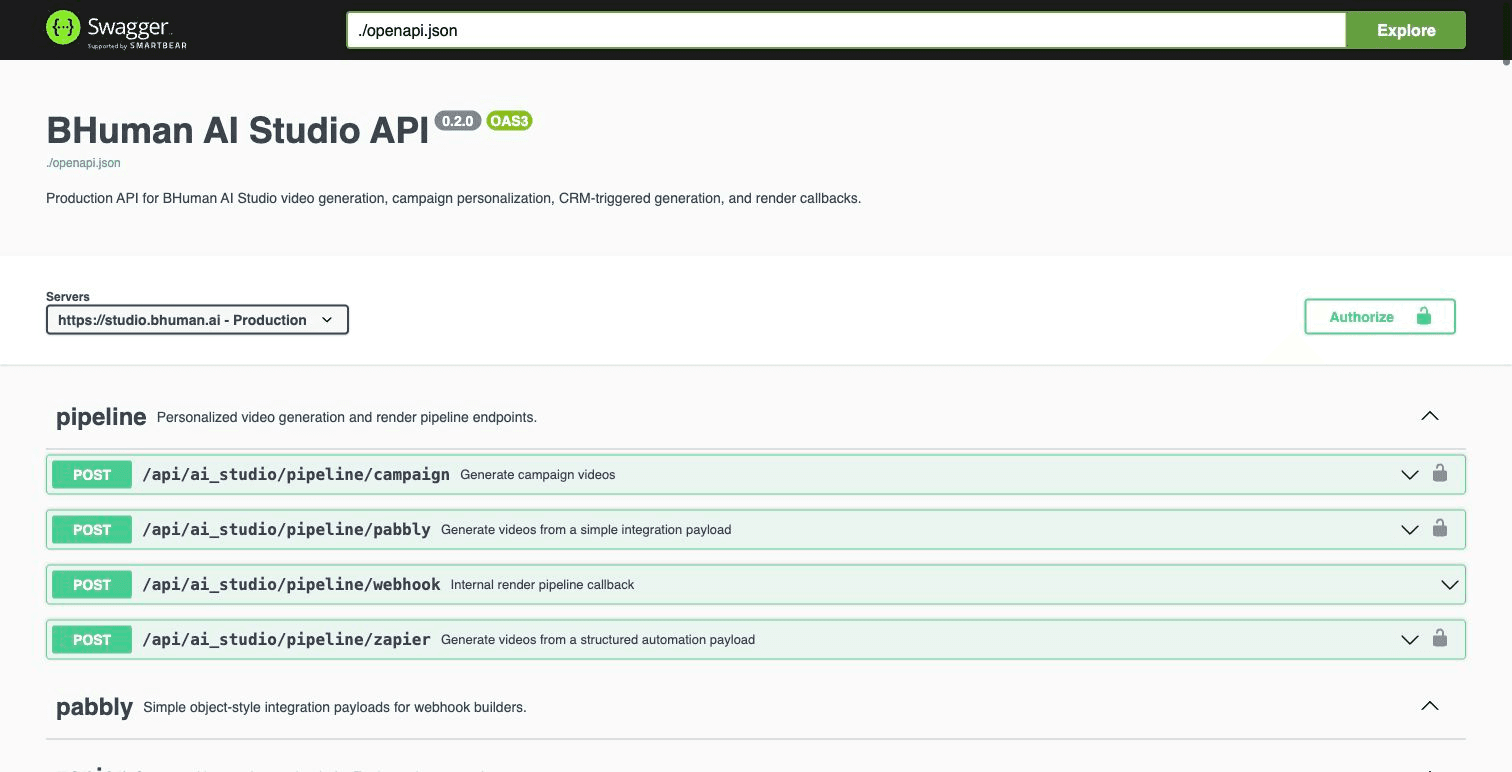
Host
Base URL
Production host
Texthttps://studio.bhuman.ai
Auth
Authentication
BHuman API keys use Basic Authentication. Generate the client ID and client secret in BHuman Settings, then send the base64-encoded credentials in the Authorization header.
Create the auth header
Bashexport BHUMAN_API_KEY_ID="your_api_key_id" export BHUMAN_API_KEY_SECRET="your_api_key_secret" export BHUMAN_BASIC_AUTH=$(printf "%s:%s" "$BHUMAN_API_KEY_ID" "$BHUMAN_API_KEY_SECRET" | base64)
Keep API keys server-side
Quickstart
Generate campaign videos
- 01
Create an AI Studio template
Record, upload, or import a video and mark the variables that should be personalized. - 02
Create or identify the campaign
Use the campaign ID when generation should follow campaign settings such as mapped variables and background configuration. - 03
Send recipient rows
Send variables and names in matching order. Each row in names creates one generated video. - 04
Collect generated assets
Use callbacks or polling endpoints to collect status, share URL, MP4 URL, thumbnail, and GIF preview.
Campaign generation
cURLcurl -X POST "https://studio.bhuman.ai/api/ai_studio/pipeline/campaign" \
-H "Authorization: Basic $BHUMAN_BASIC_AUTH" \
-H "Content-Type: application/json" \
-d '{
"campaign_id": "YOUR_CAMPAIGN_ID",
"variables": ["first_name", "company", "cta_url"],
"names": [
["Alex", "ExampleCo", "https://example.com/start"],
["Jordan", "Sample Labs", "https://example.com/book"]
],
"callback_url": "https://yourapp.com/bhuman/callback"
}'Accepted response
JSON{
"code": 200,
"result": [
"c10ee155-6202-4cec-9a40-dde536e2ab4e"
]
}Request
Common request fields
- campaign_id
- AI Studio campaign ID for campaign-based generation.
- video_instance_id
- AI Studio template ID for direct sample generation.
- variables
- Variable names in the same order as the values in each recipient row.
- names
- Recipient value rows. Each nested array maps by position to variables.
- callback_url
- HTTPS URL that receives completion details after asynchronous rendering.
- assets
- Row-by-row background asset URLs used by dynamic backgrounds.
- enable_lipsync
- Boolean option for templates and generation modes that support lip sync.
- enable_subtitles
- Boolean option to request subtitles from the edited transcript.
Response
Generated video response fields
- id
- Generated video ID.
- status
- Render state such as queued, processing, succeeded, failed, or completed.
- share_url
- Hosted video page or share destination when available.
- url
- Downloadable MP4 URL.
- thumbnail
- Generated thumbnail image URL.
- gif
- Generated GIF preview URL.
- message
- Failure or processing detail when available.
- execution_name
- Pipeline execution identifier when available.
- row_index
- The source row associated with the generated video.
Endpoints
Endpoint groups
- Pipeline generation
- POST /api/ai_studio/pipeline/campaign, /pipeline/zapier, /pipeline/pabbly, and /pipeline/leadr.
- Direct template generation
- POST /api/ai_studio/try_sample when a workflow targets a video_instance_id directly.
- Templates and campaigns
- GET video instances, one video instance, campaigns, and one campaign.
- Generated results
- GET generated videos by campaign ID, video instance ID, or generation ID.
- Speakeasy imports
- GET importable Speakeasy projects and POST a project import into AI Studio.
- Saved webhooks
- GET and POST reusable webhook destinations in AI Studio settings.
Pabbly-style payload
JSON{
"campaign_id": "YOUR_CAMPAIGN_ID",
"variables": {
"first_name": "Alex",
"company": "ExampleCo",
"cta_url": "https://example.com/start"
},
"callback_url": "https://yourapp.com/bhuman/callback"
}Import Speakeasy project
cURLcurl -X POST "https://studio.bhuman.ai/api/ai_studio/speakeasy_projects/import" \
-H "Authorization: Basic $BHUMAN_BASIC_AUTH" \
-H "Content-Type: application/json" \
-d '{
"project_id": "SPEAKEASY_PROJECT_ID",
"workspace_id": "OPTIONAL_WORKSPACE_ID"
}'Callbacks
Callbacks and polling
Use callbacks when your workflow needs to react as soon as rendering finishes. Store the generated video ID returned by the initial request so callback payloads can be matched to your records.
Completion callback example
JSON{
"id": "c10ee155-6202-4cec-9a40-dde536e2ab4e",
"status": "succeeded",
"share_url": "https://videos.bhuman.ai/video/...",
"url": "https://assets.bhuman.ai/generated-video.mp4",
"thumbnail": "https://assets.bhuman.ai/thumb.jpg",
"gif": "https://assets.bhuman.ai/preview.gif",
"row_index": 0
}- Use HTTPS callback URLs.
- Allow duplicate delivery handling in your receiver.
- Poll generated video endpoints when callbacks are not configured or when a backfill is needed.
Production
Production checks
- Test with two or three rows before submitting a large render batch.
- Keep variable names stable once a campaign, Zapier, Pabbly, or API workflow is live.
- Send asset rows in the same order as recipient rows.
- Treat generated media as asynchronous outputs, not immediate inline responses.
- Use Swagger for the latest endpoint-level request and response schema.